
How To: Filter the Noise From Your Facebook News Feed

Categories: Guides, Web

Update: We’ve published a new edition of this article for the updated version of Facebook.  Check that out instead.

Facebook has made some interface changes lately which have caused some frustration with its core users.  Most recently, they’ve removed the ability to exclusively view status updates on the Friends tab, which leaves you with only the “full firehose” of the homepage’s News Feed.  Since the News Feed displays all recent activity, my homepage has become completely inundated with quiz results and “Top 5″ lists which completely obfuscate my friend’s status updates.
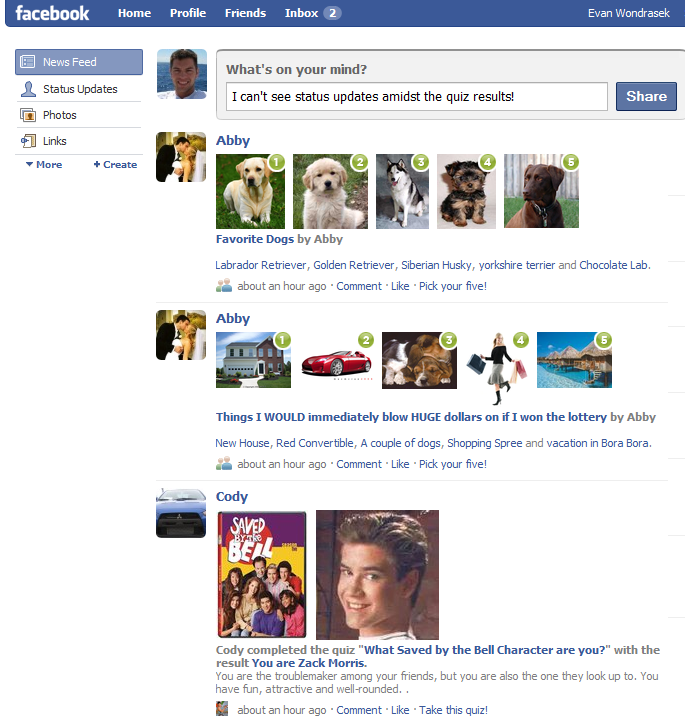
fbstatus1

Since the only thing I really care about on Facebook is what my friends are up to, I found a simple way to display only status updates on the homepage by default.  To do this, navigate to your Facebook homepage and look for the Status Updates widget in the top left corner.  If the widget isn’t visible, click the “More” button and look for it in the expanded list.
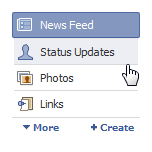
fbstatus2

Click and drag the Status Updates widget above the News Feed widget, which will cause it to be enabled by default.  From now on, your Facebook homepage will only display your friends status updates.

Have any tips that have improved your Facebook experience?  Share them in the comments!

About the Author

Evan Wondrasek is the founding editor of Techerator and is a software engineer in Minneapolis, MN. Evan recently graduated from the University of North Dakota with degrees in Electrical Engineering and Computer Science, and enjoys web design, vanilla lattes, and all things tech.

Follow Evan on Twitter.

Related Posts

  • Mike

    the other option would be to just have fewer people on your 'friends' list

  • Mike

    the other option would be to just have fewer people on your 'friends' list

  • http://intensedebate.com/people/rodlie rodlie

    wow….i've been searching for this for a long time! i can finally breathe again in facebook!!!

  • http://intensedebate.com/people/rodlie rodlie

    wow….i've been searching for this for a long time! i can finally breathe again in facebook!!!

  • Kathy

    Most people suggest to create a friend's list for filtering, but I find your way the simplest and fastest! Thanks for sharing!

  • Kathy

    Most people suggest to create a friend's list for filtering, but I find your way the simplest and fastest! Thanks for sharing!

  • Junior

    then again it is not possible to use it as a filter together with other filters, such as groups etc..

  • Junior

    then again it is not possible to use it as a filter together with other filters, such as groups etc..

  • Derrick

    facebook killed it

  • Derrick

    facebook killed it

  • http://www.techerator.com/2010/04/how-to-filter-your-facebook-news-feed-with-the-new-version-of-facebook/ How to Filter Your Facebook News Feed with the New Version of Facebook | Techerator

    [...] a year ago, I wrote a guide to filtering the noise from your Facebook News Feed that worked for the old version of Facebook.  The News Feed can get really messy when a lot of [...]

  • http://www.islandrescue.org Jay M.

    The article is out of date. Facebook has even removed the Status widget since this was written. They seem to want to force me to see all of the noise rather than just the content.

  • http://www.techerator.com Evan W.

    Hi Jay,

    We've written an updated version of this article for the new Facebook, you can check it out at http://www.techerator.com/2010/04/how-to-filter...

    Evan

  • Terri

    Just use firefox or chrome with the ffixer addon for greasemonkey. It works and you choose what you want to see.

  • Terri

    Just use firefox or chrome with the ffixer addon for greasemonkey. It works and you choose what you want to see.

blog comments powered by Disqus