
I use iGoogle as my browser start page which allows me to quickly view things like the news, weather, movie showtimes, my to do list, and email when I open my browser. iGoogle is completely customizable and supports a great variety of themes. I only have one problem: the search header and sidebar take up a lot of valuable space that could be used for content.
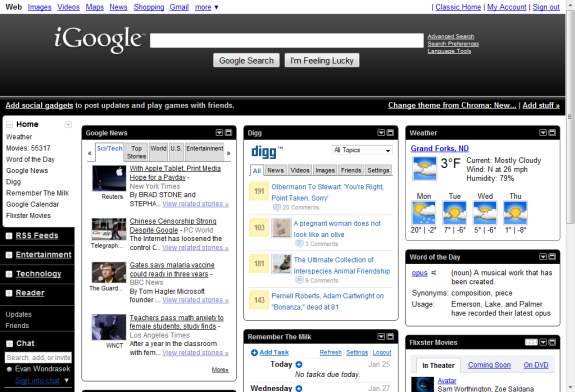 A simple way to condense the extra space in iGoogle is to use the Super iGoogle Greasemonkey script. Super iGoogle lets you toggle the search header, footer, and sidebar and replace them with a mini menu and shortcut keys.
Here’s how to use it in Firefox:
- Install the Greasemonkey add-on for Firefox.
- Click the green Install button on the Super iGoogle Userscripts page.
- That’s it – open iGoogle!
Not using Firefox? That’s alright, Super iGoogle also supports Chrome and Opera.
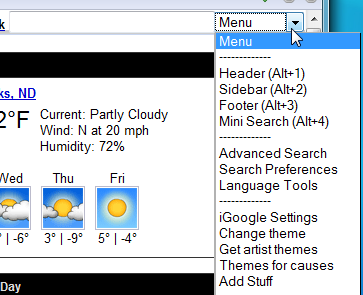
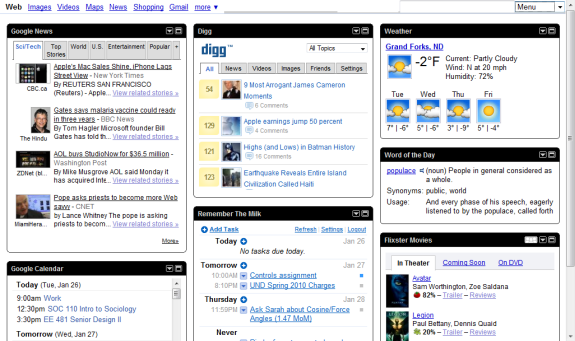 You will notice the search bar is still visible in the top right corner of the screen, and all controls and original options are available under Menu.
 Be sure to check out our coverage of other great Greasemonkey scripts.
Leave a Reply
You must be logged in to post a comment.