
Category: Mobile
-
Facebook Acquires WhatsApp for a Whopping $19B
Probably one of the most hostile takeovers of our time, Facebook has acquired its rival WhatsApp. In terms of value creation, this is the biggest on record. Sequoia Capital reportedly invested only $8 million back in 2011 in WhatsApp and no additional funding was announced after that. This initial investment has thus turned out to…
-

Cell phone use may be allowed on airplanes, says FCC
Now that flyers of all destinations can enjoy their virtual books through turbulence, landing, and even the seatbelt speech (though, for everyone’s sake, they shouldn’t), travelers are on the verge of one more flight-changing decision. Just a few weeks after the announcement that eReaders are now safe for airplanes – from start to finish –…
-
Looking for a Good Deal on an iPhone? Head to a Retail Store
By now it’s nothing new to see smartphone kiosks throughout Target, Walmart, or any other chain store. To optimize user experience and to make the wait time much shorter, phone companies have teamed up with these moguls to greatly increase the locations in which consumers can purchase their next phone. And considering the shorter lines,…
-

4 Apps to Make Traveling Easier
When on the road, even the most routine and everyday events can be made difficult. You can buy kratom for chronic pain for the road, and you can buy the right kind of travel pillow, and that doesn’t even begin to encroach on the problems. Internet connections can be hard to find, technology may not…
-
How to make a DIY smartphone stand for under $1
Smartphone stands are a great way to watch content on your phone without having to hold the phone upright, and there are a ton of different DIY methods for making them. A lot of them are made so that they’ll hold your phone horizontally, but some users want stands that prop up their phones vertically,…
-
Distributed computing comes to Android with BOINC
Our understanding of the world around us has grown by leaps and bounds since the invention of the computer. The simulation of complex systems in particular involves crunching a ton of numbers, a task computers excel at. Unfortunately, the very best number crunchers happen to be extremely expensive, both to buy and to maintain. Through…
-
The Current State of Platform, Software and Device Security
The year 2012 and the better part of 2013 have witnessed the birth of new computing platforms, social network platforms and general computing trends that not only make the gadget and internet a better place, but also a more dangerous one. These innovations and developed habits expose us to a variety of threats that we…
-
Will book apps replace the ebook?
More and more people are reading ebooks instead of physical books nowadays. It’s a platform that continues to be popular and it’s definitely a lot easier to carry dozens of books on a tablet than to carry even a few actual books with you on vacation. As ebooks continue to grow in popularity, there’s a…
-
The Budget iPhone: A Risk for Apple?
The Apple rumor mill is currently working overtime with reports and leaks related to a new low-cost iPhone. In recent weeks, various photos have emerged, including the rear view of a plastic iPhone in a range of colors, as well as a pile of plastic boxes for an “iPhone 5C.” While there’s nothing to guarantee that…
-
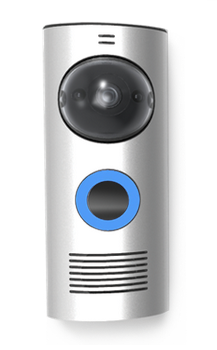
New doorbell lets you answer the door from anywhere
In the growing list of items to become “smart”, now comes the doorbell. Wi-fi enabled, video stream-able, and recreating the definition of privacy laws, this doorbell puts a completely new take on answering the front door. Known as the DoorBot, this new invention brings both safety and technology to the old fashioned knock at the…