
I recently found the need to have one of Techerator’s email accounts automatically forward emails to multiple recipients for notifications. Gmail has built-in email forwarding (to a single email address), but there is a very simple trick to forward to multiple addresses.
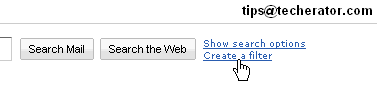
- In Gmail, click the ‘Create a filter’ link at the top, near the search box.
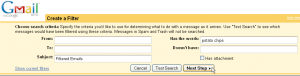
- You can now create a filter to only forward select messages, or if you want to forward all messages you can enter the current account’s email address in the ‘To:’ field (in this example, it would be tips@techerator.com). Click ‘Next Step’.
- In the next screen, check the Forward it to: box and enter one of the desired email addresses in the box. Don’t worry, we’ll add the other addresses in the next step. Click Create Filter.
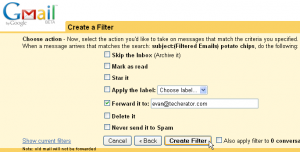
- Repeat this process for any additional email addresses you want to forward messages to. Be sure to keep your filter settings the same to avoid any incongruities.
Tagged:
But isn't there a limit of 20? Can't you forward to a group? Helen
You are correct, while you can create unlimited filters, it turns out that only 20 of them can be forwarded to other email addresses (via http://mail.google.com/support/bin/answer.py?answ... )
It appears that you can only forward to a single email address when creating a filter, so it does not look like it is possible to send to a group or multiple addresses in the single field.
there´s a workaround that kind of works by using google groups
This will only forward messages sent directly to you. This will not forward mailing lists, or BCC messages.
To forward all messages, put * as the To: field.
I have tried to put "*" and the email account's email address in the To: field but I am not getting anything forwarded. Any ideas on how to fix?
See the process the same if you want to forward a gmail to an e-mail account outside of gmail??
thanks.Dennis
Yes the process is the same when forwarding to any address, not just Gmail.
See also this:
http://mail.google.com/support/bin/answer.py?answ...
http://services.google.com/tutorial/gmail_labels/
is there a way i can forward to more than 20 email addresses, i need
Thanks Evan, great tip!!
Is there a way to “hide recipients” so that others will not be able to see email addresses? I don't like forwarding to multiple recipients when those addresses are available for others to use. Is there a setting or way to hide them?