
Did you know that Facebook could use your name and picture in advertisements shown to your friends? They can (and already are) unless you’ve dug through several layers of settings and manually disabled it.
Facebook explains:
Facebook occasionally pairs advertisements with relevant social actions from a user’s friends to create Facebook Ads. Facebook Ads make advertisements more interesting and more tailored to you and your friends. These respect all privacy rules.
So what does that mean? Well, if I was to add “amateur science” to my interests, you could legitimately see something like this on your main page:
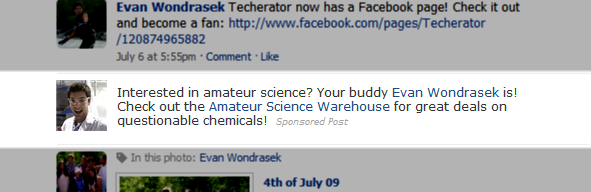
While there isn’t anything particularly harmful about this type of advertising, it is making you an unknowing spokesperson for something you might not want to publicly support. Even worse, this feature is enabled by default and hidden deep within your privacy settings.
Here’s how to prevent your likeness from being used in Facebook ads:
- Click Settings –> Privacy –> News Feed and Wall
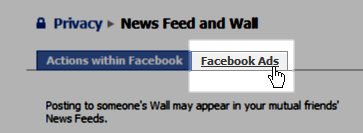
- Click the easily-neglected Facebook Ads tab at the top of this page
 Set the Appearance in Facebook Ads field to ‘No one’
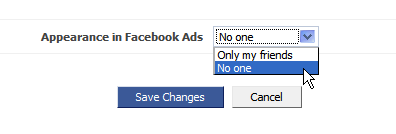
You’ll now be free of any accidental or unknown participation in Facebook advertisements.
What are your thoughts about Facebook’s decision to include you in advertisements by default? Share them in the comments.


Leave a Reply
You must be logged in to post a comment.