
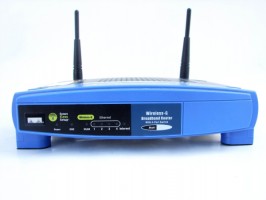
 There may be a time when you have access to a wireless network in one part of your house, but just can’t get it anywhere else. This isn’t a big deal if you own the network (you can buy another access point or wireless repeater), but if you don’t own the network, this guide will show you how to extend your free coverage.
What’s the purpose of this, you might ask? In my case, I can connect to several wireless networks in my bedroom where my PC is located. Unfortunately, I can’t access those networks in my living room where my Xbox 360 is located. The technique presented in this guide allowed me to use my PC to pick up a wireless signal, share it with my PC’s Ethernet connection, and then rebroadcast it with a router.
What You’ll Need:
- A working wireless connection
- A computer running Windows XP, Vista, or 7 with an unused Ethernet port
- A configured wireless router set to DHCP mode (I’ll be using a WRT54GL with Tomato firmware, but anything will work). Every router is different, so make sure you configure your router’s settings (SSID, security, etc) before you begin this guide.
- An Ethernet cable
Windows XP
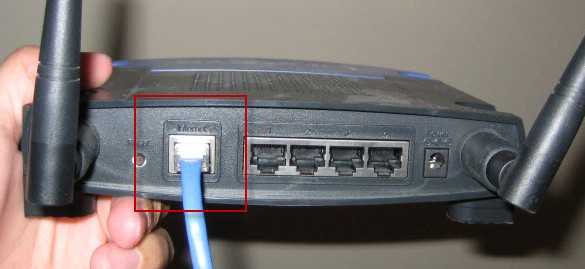
- Connect your wireless router to your PC’s unused Ethernet port with an Ethernet cable. Make sure to connect the cable to the source or internet port on your router, not one of the numbered outputs.
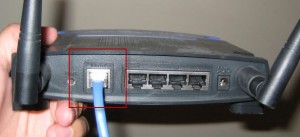
- Power the wireless router.
- In Windows, right click the Network icon in the system tray and select Open Network Connections.
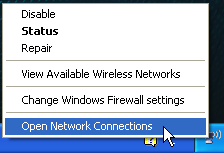
- Right click your wireless connection and select Properties.
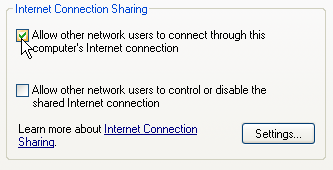
- Click the Advanced tab and select “Allow other network users to connect through this computer’s Internet connection”. This will allow your computer’s Ethernet port to access your wireless internet connection. Click OK.
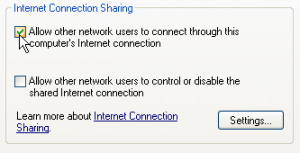
- If you don’t see an option for sharing your connection, verify that you have a second connection enabled on your computer.
- You now need to give your Ethernet connection a static IP address. In the Network Connections window again, right click your Local Area Connection and select Properties.
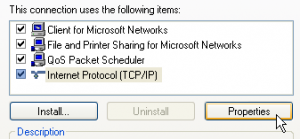
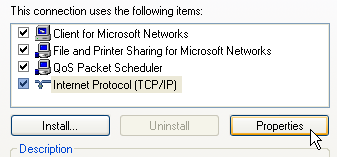
- Select Internet Protocol (TCP/IP) and click the Properties button.
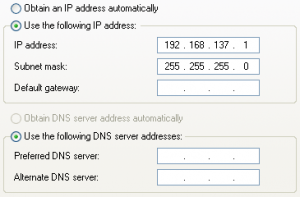
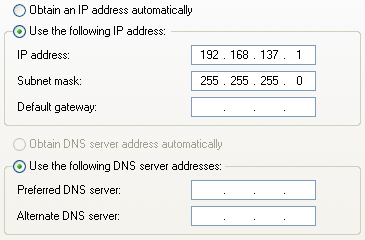
- Select Use the following IP address: and provide an address. I arbitrarily used 192.168.137.1. Set ‘Subnet Mask:’ to 255.255.255.0. Leave the DNS settings blank and click OK.
- Your rebroadcasted wireless network will now be up and running!
Windows Vista
- Connect your wireless router to your PC’s unused Ethernet port with an Ethernet cable. Make sure to connect the cable to the source or internet port on your router, not one of the numbered outputs.
- Power the wireless router.
- In Windows, right click the Network icon in the system tray and select Network and Sharing Center.
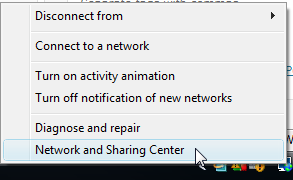
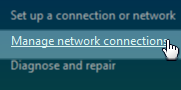
- Click Manage network connections on the left side of the window.
- Right click your wireless connection and select Properties.
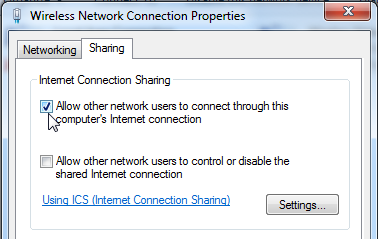
- Click the Sharing tab and select “Allow other network users to connect through this computer’s Internet connection”. This will allow your computer’s Ethernet port to access your wireless internet connection. Click OK.
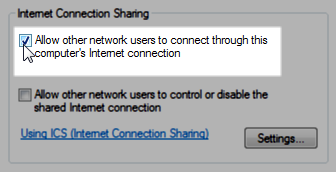
- If you don’t see an option for sharing your connection, verify that you have a second connection enabled on your computer.
- You now need to give your Ethernet connection a static IP address. In the Network Connections window again, right click your Local Area Connection and select Properties.
- Select Internet Protocol Version 4 (TCP/IPv4) and click the Properties button.
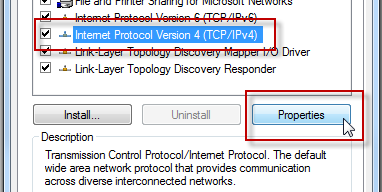
- Select Use the following IP address: and provide an address. I arbitrarily used 192.168.137.1. Set ‘Subnet Mask:’ to 255.255.255.0. Leave the DNS settings blank and click OK.
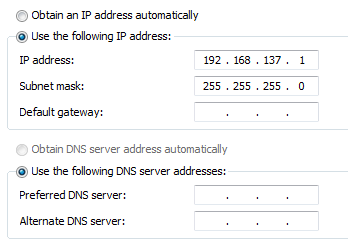
- Your rebroadcasted wireless network will now be up and running!
Windows 7
- Connect your wireless router to your PC’s unused Ethernet port with an Ethernet cable. Make sure to connect the cable to the source or internet port on your router, not one of the numbered outputs.
- Power the wireless router.
- In Windows, click the Network icon in the system tray and select Open Network and Sharing Center.
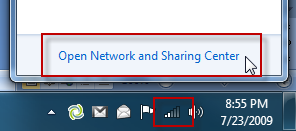
- Click Change adapter settings on the left side of the screen.
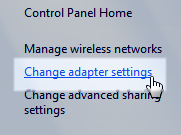
- Right click your wireless connection and select Properties.
- Click the Sharing tab and select “Allow other network users to connect through this computer’s Internet connection”. This will allow your computer’s Ethernet port to access your wireless internet connection. Click OK.
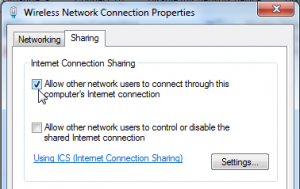
- If you don’t see an option for sharing your connection, verify that you have a second connection enabled on your computer.
- You now need to give your Ethernet connection a static IP address. In the Network Connections window again, right click your Local Area Connection and select Properties.
- Select Internet Protocol Version 4 (TCP/IPv4) and click the Properties button.
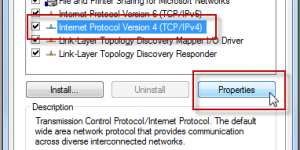
- Select Use the following IP address: and provide an address. I arbitrarily used 192.168.137.1. Set ‘Subnet Mask:’ to 255.255.255.0. Leave the DNS settings blank and click OK.
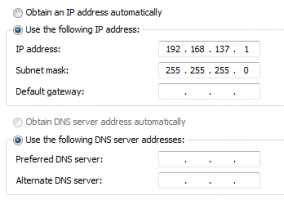
- Your rebroadcasted wireless network will now be up and running!
While rebroadcasting a weak signal does give you better access to a wireless network, it does have some inherent disadvantages. Port forwarding will now be twice as complex, and there will most likely be a high amount of network latency induced. That being said, I didn’t personally notice much of a difference browsing the internet on my laptop or using Xbox Live.
Have any other ideas for accessing wifi on the cheap? Let us know in the comments.


Leave a Reply
You must be logged in to post a comment.