
Techerator
Guides, Windows Vista

Fix: Windows Vista 64-bit Gets Blue Screen After Windows Updates

A recent Windows Update (KB973879) has been causing a “blue screen of death” (stop error) in many computers running Windows Vista 64-bit edition.  Many of the affected computers are HP Pavillion dv Series laptops (such as dv4 and dv6 models), but we have had reports of other manufactures having the same issues.  The problem occurs shortly after starting the computer.

The specific error is:

A problem has been detected and Windows has been shut down to prevent damage to your computer.

Technical information:

*** STOP: 0×0000007E (0xFFFFFFFFC0000005, 0xFFFFF800020393AA, 0xFFFFFA60021EE7D8, 0xFFFFFA60021EE1b0)
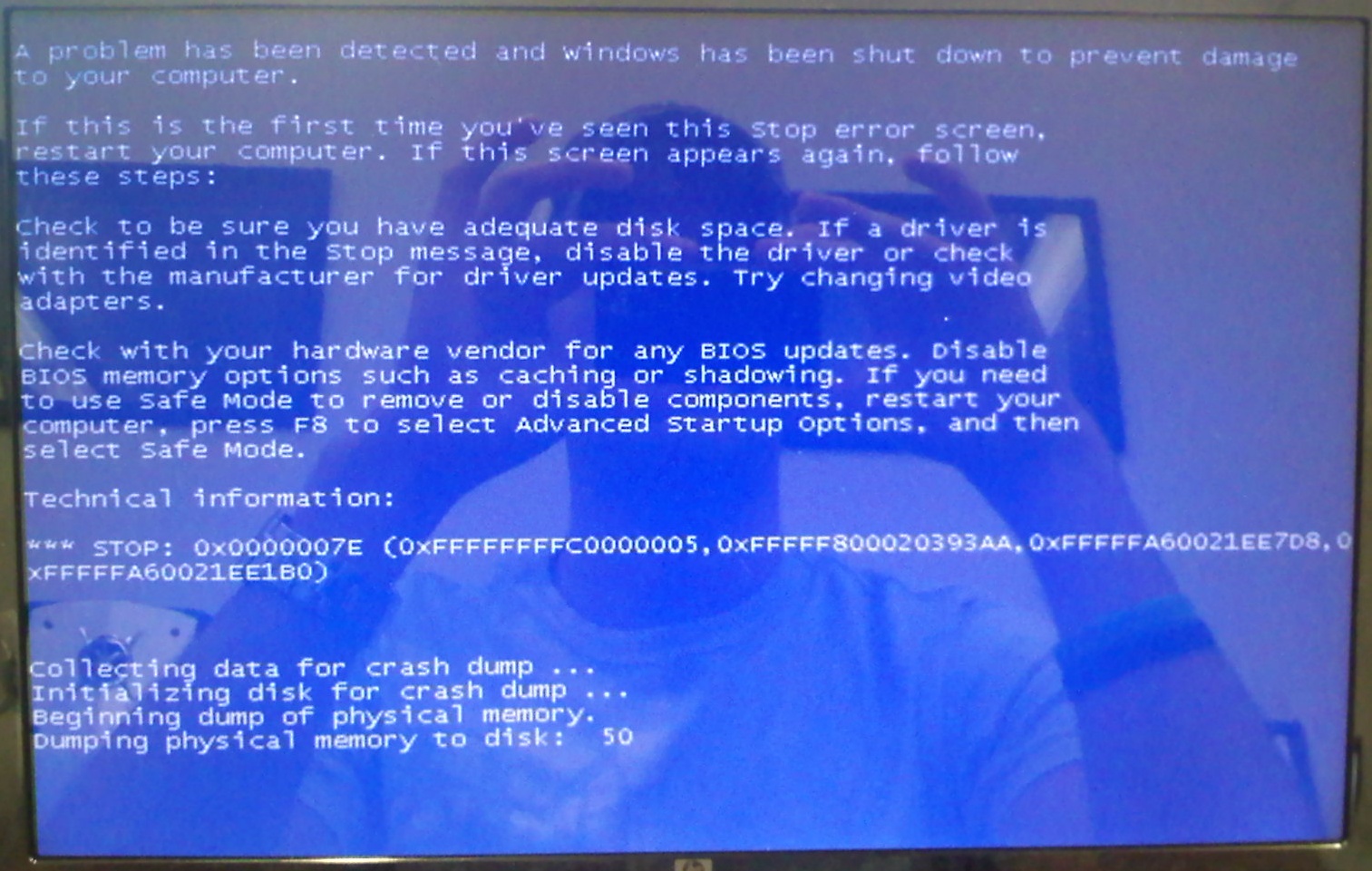
hp-bsod

So far, we have found two methods to fix this problem.  Try the first method (using Safe Mode), and if that doesn’t work try the second method (using System Restore).

Method 1 (Safe Mode)

Step 1: Restart your computer and continuously tap the F8 key while it is restarting.  You will eventually see the ‘Advanced Boot Options’ screen, where you need to select the Safe Mode option.
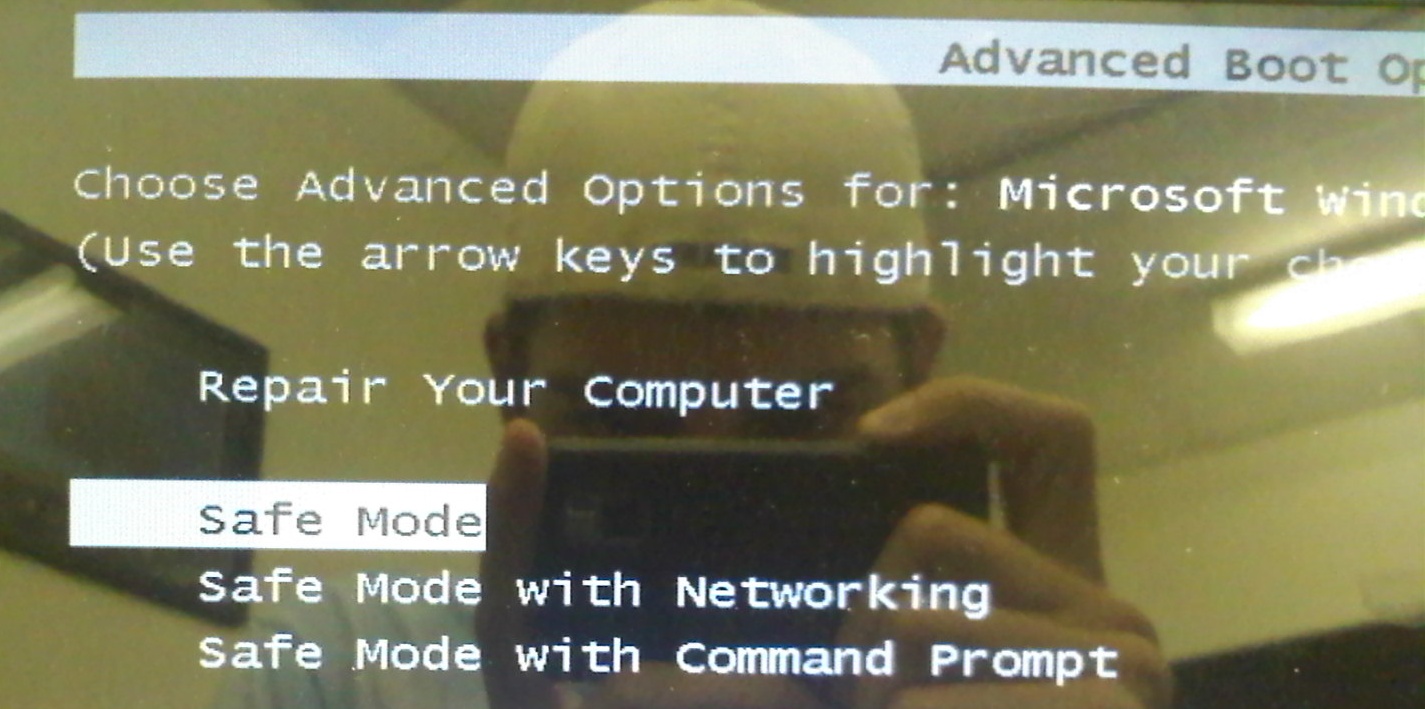
hp-bsod-safemode

Step 2: Click the Start Menu and type Programs and Features in the search box.  Press enter when the Programs and Features option is selected.
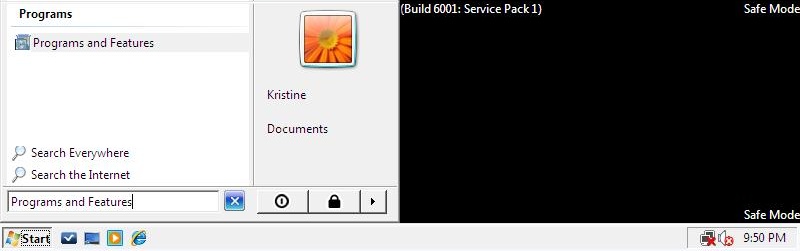
hp-bsod-startmenu

Step 3: Select View installed updates in the top left of the window.
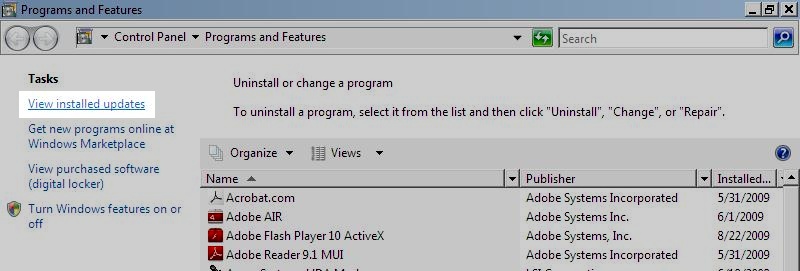
hp-bsod-viewupdates

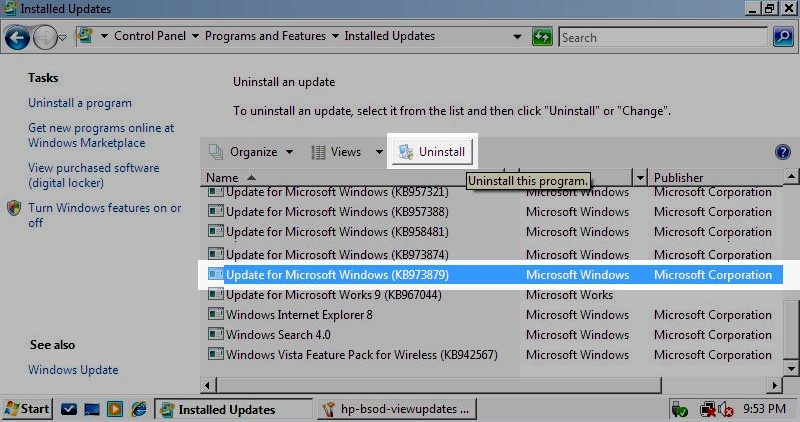
Step 4: Locate Update for Microsoft Windows (KB973879) in the list of updates.  You can sort by name for easier searching by clicking the Name column.  Click Uninstall at the top of the list.
hp-bsod-uninstall

Step 5: Click Restart Now.  Your computer should now function properly.  If not, try Method 2 below.

Method 2 (System Restore)

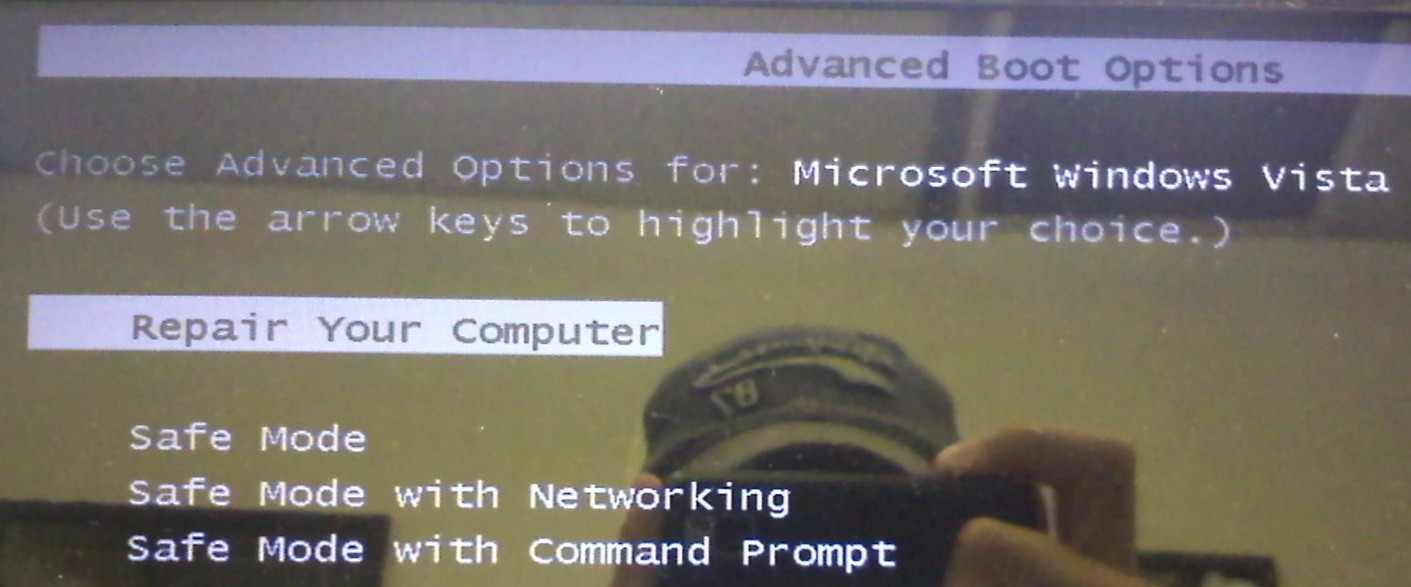
Step 1: Restart your computer and continuously tap the F8 key while it is restarting.  You will eventually see the ‘Advanced Boot Options’ screen, where you need to select the Repair Your Computer option.
hp-bsod-repair

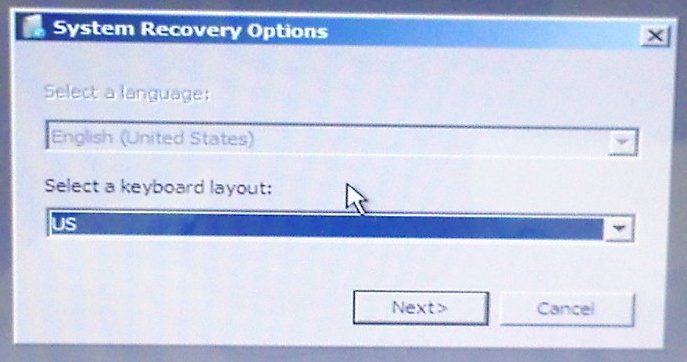
Step 2: Select your keyboard layout, which will typically be ‘US’.
hp-bsod-keyboard

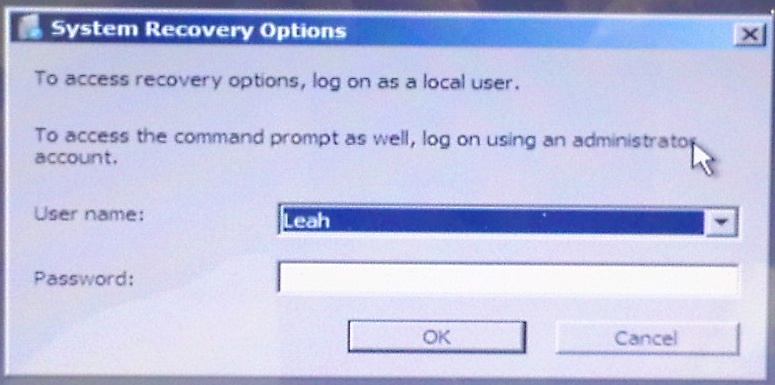
Step 3: Enter your username and password.  If you have no password, just click OK.
hp-bsod-username

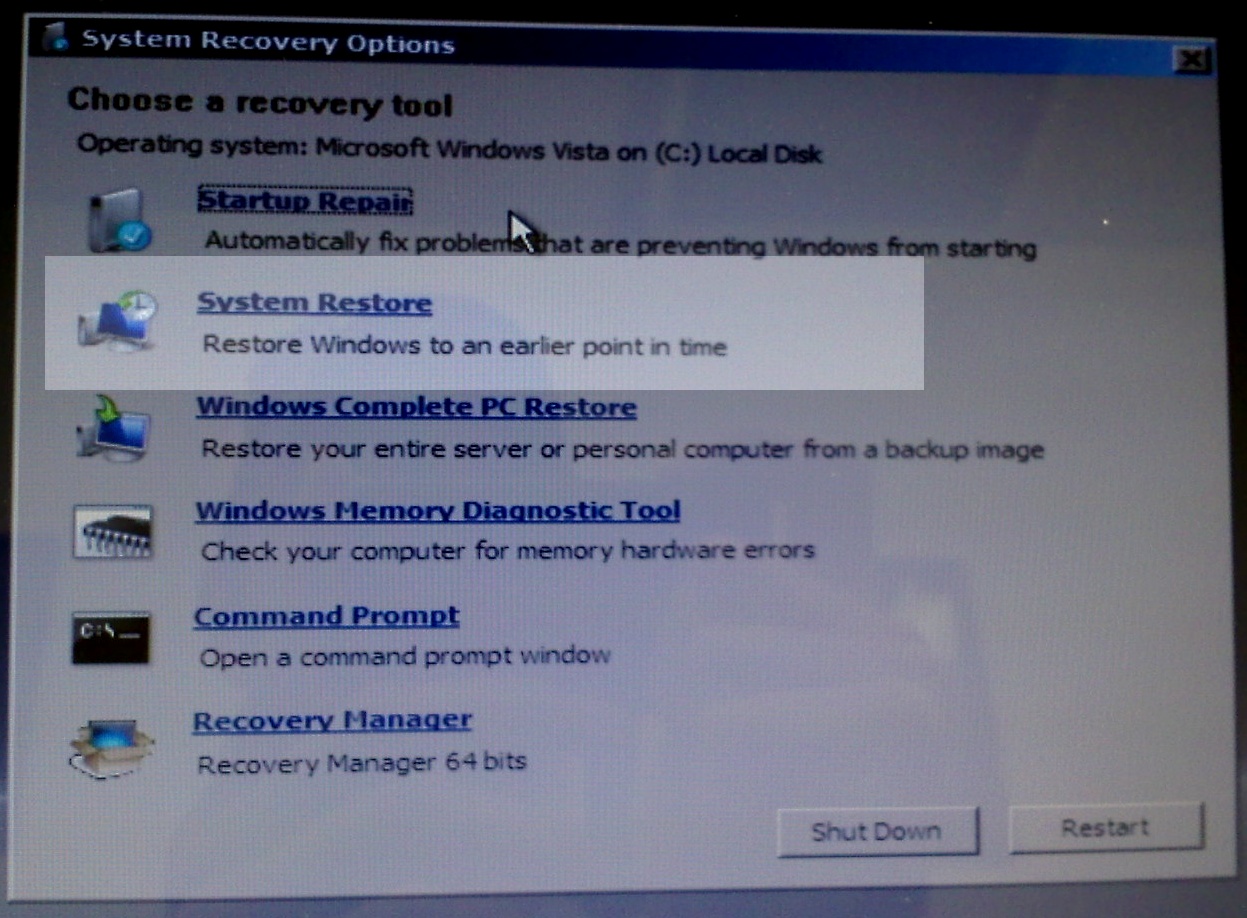
Step 4: Click System Restore in the System Recovery Options menu.  This may take a few minutes to launch so be patient.
hp-bsod-restore

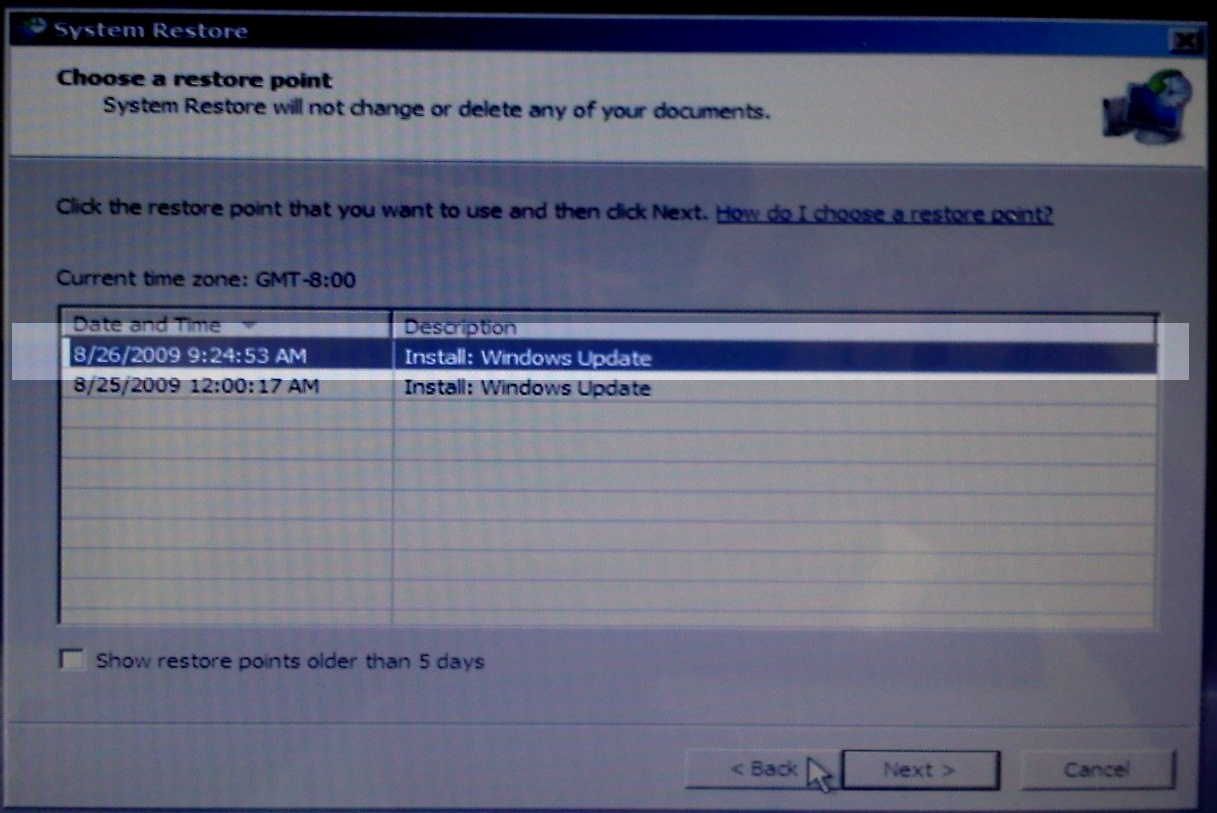
Step 5: When the System Restore window opens, click Next.  Select the most recent system backup and click Next.
hp-bsod-restoreupdate

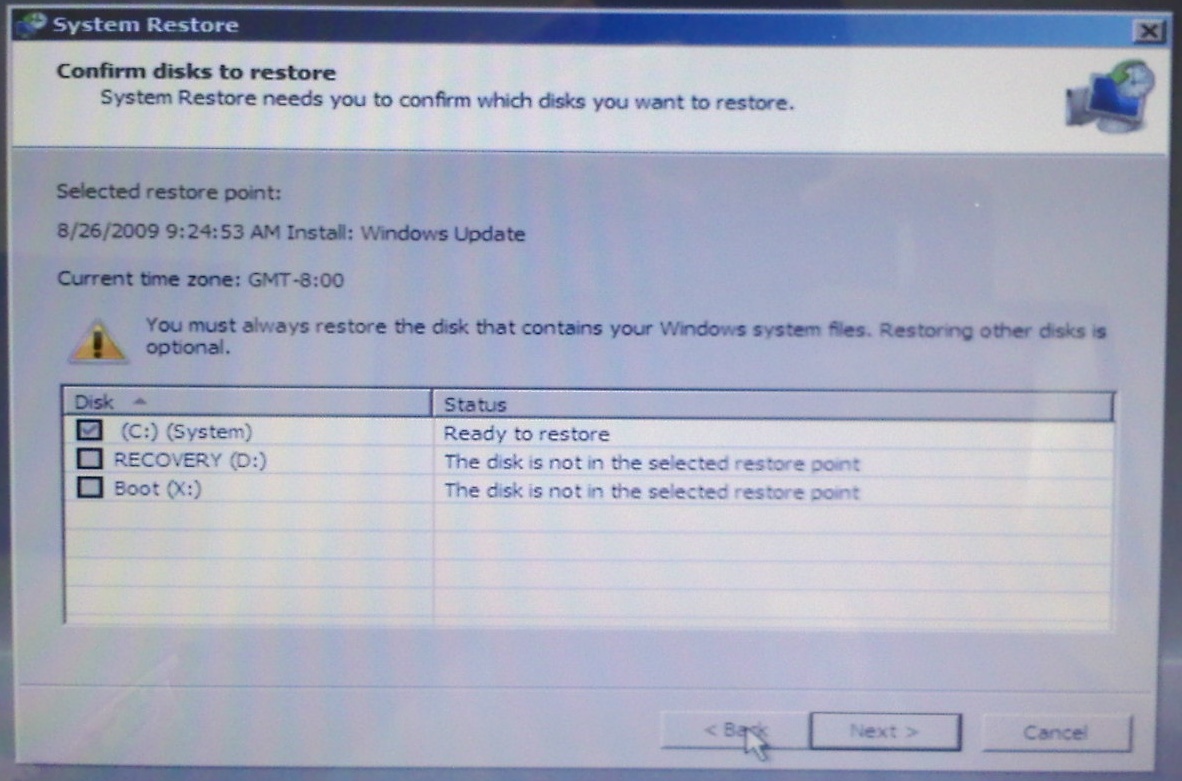
Step 6: Make sure your main drive is selected (most likely C:) and click Next.  Click Finish in the next screen.  Click Yes to the warning dialog.
hp-bsod-selectdrive

Step 7: When the restore has finished, you shoud receive a successful completion message.  Click the Restart button.

Step 8: When your computer  has restarted, click the Start Menu and type Programs and Features in the search box.  Press enter when the Programs and Features option is selected.

hp-bsod-startmenu

Step 9: Select View installed updates in the top left of the window.

hp-bsod-viewupdates

Step 10: Locate Update for Microsoft Windows (KB973879) in the list of updates.  You can sort by name for easier searching by clicking the Name column.  Click Uninstall at the top of the list.

hp-bsod-uninstall

Step 11: Click Restart Now.  Your computer should now function properly.

Have you experienced this problem?  Tell us about it (including the model of computer you have) in the comments.

  • Share/Bookmark

About the Author

Evan Wondrasek is the founding editor of Techerator and is currently studying Electrical Engineering and Computer Science at the University of North Dakota. He enjoys web design, vanilla lattes, and all things tech.

Want to connect? Follow Evan on Twitter!

  • Did you enjoy this article? Subscribe to Techerator via email to get updates with more great tips, guides, and reviews.

    Enter your email address:

This website uses IntenseDebate comments, but they are not currently loaded because either your browser doesn't support JavaScript, or they didn't load fast enough.

Comments

129 Responses to “Fix: Windows Vista 64-bit Gets Blue Screen After Windows Updates”
  1. ben g says:

    hi this also happens with some dell laptops because i have had this problem iv read it could be a certain proccesor that this is linked to im running a core 2 duo p8600 on 64 vista home premium iv now fixed the problem by deleting the update. however isnt this the update for service pack 2 have they now bought out a different update for service pack 2 i no that they have now took the update that caused the problem of thier site thanks ben

  2. Mary says:

    I have been cursing this occuring on a 3 week old Dell 1545. I had worked out that it was connected to my USB drives and was beginning to consider restoring the system. However, thanks to this first fix, its sorted in seconds. Many thanks. Jeff…I found the offending update on the very bottom of my list.

  3. Graeme says:

    Hi Evan, i hope you can help me. i have a new HP dv6. about once a week i get a BLANK blue screen. everything disappears and the only way i can treat it is to press and hold the power button until it powers down. on reboot, everything works fine for a week or so the wham, it happens again. i can't see any pattern as to what might trigger it. any thoughts?

    • evanw says:

      Blue screens are commonly generated by hardware, so it may help to make sure all drivers for your computer and peripherals are updated to the newest versions. Your computer manufacturer's website should have the most recent drivers available, just search for your specific model under Support/Drivers. Please let me know if you have any questions with this process.

  4. Rick says:

    I thought this was definitely my problem but I was disappointed to see that I did not have this update installed. :( I guess my search for the cause of my BSOD's continues.

    • evanw says:

      Hi Rick,

      What error number are you getting on the blue screen? Are you using Windows Vista 64-bit?

      • Rick says:

        Hey Eric,

        Yea I'm on 64bit Vista Ultimate. Last week I woke up in the middle of the night to my system rebooting to BSOD over and over. I remember I installed SP2 and it seemed fine for a day or two. I'm sure some other updates were in there too.

        I'm at work right now but I remember seeing 0×0000007E and 0×00000050.

        Thanks for the quick reply.

        • When following Method 1 and getting to Step 3/4 (viewing installed updates), click the Installed Date column and look at the most recently installed updates. Could you post those updates?

          • Rick says:

            I forgot to mention that I reinstalled windows so all updates are recent. But here are some:
            KB973874
            KB970653
            KB969058
            KB968389
            KB967190

            There are too many to list and I can’t copy and paste. I thought this might be RAM but I successfully ran MemTest. I’m going to run ChkDsk soon.

  5. Rick says:

    I forgot to mention that I reinstalled windows so all updates are recent. But here are some:
    KB973874
    KB970653
    KB969058
    KB968389
    KB967190

    There are too many to list and I can't copy and paste. I thought this might be RAM but I successfully ran MemTest. I'm going to run ChkDsk soon.

  6. AD5 says:

    I suffered this crash last week and was told to do a complete “system restore” by Tech Support before finding this site. Your solution worked great and I wish I would have seen it first. However, I did a complete restoration and now I notice the same Windows Update (KB973879) available for installation in today’s (9/1/09) updates. My question is this…is this the exact same update or did Windows correct the problem and this update is trustworthy? My laptop (dv6) is 4 weeks old so do I even need this update since it deals with the Vista Service Pack? I’ve hidden the update until I get additional insight. Hopefully, Windows 7 won’t have these same issues!

    • Hello,

      I just read that Microsoft has released a second version of the update (but apparently didn't change the KB number, which I think would scare off many users). They have officially said that the new version should not cause any problems, but it might not be a bad idea to wait a week or so just to verify that with other users.

      Here's a link to their information on the 2nd version of KB973879: http://support.microsoft.com/kb/973879

      • AD5 says:

        Thanks, Evan! With my laptop being only 4 weeks old, do I even need this update? The website claims:

        “When you try to install Windows Vista Service Pack 2 or Windows Server 2008 Service Pack 2 on the computer, you receive the following Stop error message:
        Stop 0×0000003E (parameter1, parameter2, parameter3, parameter4)
        MultiProcessor_Configuration_Not_Supported”.

        I’m not trying to install the VSP2 or WS 2008 SP2 and don’t receive that error. The initial update just gave me the blue screen. Shouldn’t my 4-week old laptop already have these Service Packs loaded?

        • Even brand new computers are typically behind on updates – most of the time an OEM copy of Windows is installed by the manufacturer and there is no guarantee that subsequent (non-service pack) updates were installed.

          To be honest, you probably don't need the update. Windows sees it as an important system update though, so it will probably insist you install it regardless of its relevance to your system. It might not be a bad idea to hold off on updating (temporarily), but if you do decide to update you may want to set a system restore point before you do.

          To set a system restore point:

          1. Open your Start Menu and right click on Computer and select Properties.
          2. Click "Advanced system settings" on the left.
          3. Click the "System Protection" tab in the following window.
          4. Click the "Create" button which will set a new restore point.

          So if the new update does indeed cause problems, you'll have a very recent restore point you can revert to (using Method #2).

          I hope that can be of some help – please let me know if you have additional questions!

          • AD5 says:

            Thanks again, Evan! I passed your info on to a friend and it saved him a ton of time and headache. Like said in my first post, I just wish I could have found your page first. Techerator is now on my favorites list and will be my first stop for technical assistance. Your advice is very helpful!!

  7. chrisB says:

    Same question as above – the update is back today 9/1 w/ the same number. Do we install or not? I can't believe Microsoft did not send a bulletin regarding this MAJOR issue.

  8. John says:

    It seems to me that older HP laptops are also taking the hit. I've got a dv6625 that has two updates that failed to install with Windows Update (KB970653 and KB972036) and somehow got themselves installed anyway, my pc got stuck in a endless loop during startup, with the 3rd fase of the installation making the pc reboot…I thank HP for the System Recovery option during POST, otherwise I wouldn’t be able to restore the system. Safe mode (Except command prompt, which I didn't try) and other attempts proved hopeless since Windows just wanted to finish the installation. I think a IE8 update may also be involved…but I'm not sure about that one. Still, your guide is very good and useful, unless my case happens…

  9. KJS says:

    Had the same problem with a new Dell computer I got 5 days ago. Thanks for the help. Very clear and easy to follow.

  10. edgar says:

    Hi , Evan

    I have same problem of BSOD mentioned. but i follow your steps but unfortunately i cannot find of said KB973879, any ideas?

    regards,
    Eddie

  11. john says:

    i had the same problem on an DELL inspiron 1750 running OS vista home premium x64 bit edition same update same blue screen same story (installing SP2 update) i followed your instructions and now is fine thank u so much.john uk

  12. Dclong45 says:

    Yep This is just what I did and it worked like a charm. I was a hair away from returning my brand new HP too. I got my help from an alert that came up when I went into safe mode. I used safe mode with networking and was able to follow the link to a helpful note online that explained this same process. I was freaked out though when it happened and then again after I did a system recovery and the same update came back around and killed my machine again. What's with MS and Vista? Sheesh.

  13. Aaron says:

    I have the hp pavilion tx 2000 64 bit and ive have double checked and wrote the KB number down, and checked it again. that KB number is not in my system. I have the KB973874 but not the 79 and i get the blue screen error. what else can i do to fix this problem since i dont have that KB number and its still doing it????
    Thanks,
    Aaron

  14. ScoutinAruba says:

    TNX a lot man, my brother bought a HP DV6 and I an HP DV4. My brother was the first victim, not expecting I was next. When my lap crashed I went to the internet for help and saw your post. Tnx again man for the detailed explanation.

  15. faton says:

    hello i have the same problems today, i have done the windows update but i kept getting the blue screen. i did a system restore without reading this page. after following solution 1 i cant seem to find the file KB973879 on programs and features and solution 2 i dont know how to find the repair your system when i press f8. please anyone help thank you

  16. alex says:

    having a similar problem after windows update 09/09/09. can't boot into vista64, always getting blue screen.
    safe mode -> blue screen, system resrote via vista dvd -> blue screen. memtest is ok. i have a vista pe cd, which starts successfully, BUT how do i remove the windows update from there?
    microsoft support page says "boot CD and then perform an offline uninstallation of update KB973879."
    how to perform offline uninstallation??? thanks in advance

  17. alex says:

    having a similar problem after windows update 09/09/09. can't boot into vista64, always getting blue screen.
    safe mode -> blue screen, system resrote via vista dvd -> blue screen. memtest is ok. i have a vista pe cd, which starts successfully, BUT how do i remove the windows update from there?
    microsoft support page says "boot CD and then perform an offline uninstallation of update KB973879."
    how to perform offline uninstallation??? thanks in advance

  18. Deb says:

    Thank you so much, I have a Dell Studio 17, and I got the blue screen error everytime I unplugged a usb device, and sometimes for no reason at all. I was just about to reformat my computer before I tried your fix!

  19. ljmaxx says:

    the people where i bought my system 7 days ago told me yesterday that the reason i am getting the blue screen of death is because i loaded an adobe 32 bit program into my 64 bit pc and it will cause the screen to happen. even if I didnt open or wasnt using the adobe program when the blue screen happens.. Is this a possiblitly…? Please advise me. I am not a pc guru and need some helpful advise.. Please. :)

  20. h1ren says:

    This is as close one can get to the true solution…

    My Dilemma:

    I am getting EXACTLY the same blue screen error but I don't see KB973879 as part my recent updates… How do I resolve or what do I look for to rectify this error. I never had this problem before, but after several recent updates this error shows up more then frequently.

    Also, I don't have "System Restore" running, so that solution is out of question. But reading this page I am convinced that the error is because of recent windows update. I have even formatted and re-installed the Vista (twice) but same results after I ran the windows update.

    My System:

    Windows Vista 64-bit Home Premium
    HP M9400F
    8 GB RAM
    AMD Phenom 9750 Quad-Core Processor 2.40 GHz

    Any help, I would love it :)

  21. danbrown says:

    Hello,I appreciate your effort,but sill i am not able to solve this problem.
    Starting in safe mode shows the blue screen.
    And as my laptop is new i haven't not create any restore point.
    Kindly provide some solution.

  22. gguillotte says:

    I have this problem on my Toshiba L305D-S5934, and will be trying this out shortly. Thanks so much for your work in narrowing down which update was causing this.

  23. Penny says:

    I'm also receiving this error but on my older HP desktop with XP – can you provide a fix for XP? Any help is greatly appreciated!

  24. Bill says:

    I also have the BSOD. Just got the HP and it crashes daily. I did this search and don't have that update. Is there another?

  25. Larry says:

    I just got a Lenovo Y550 a month ago with Windows 64 bit. Started crashing (freezing) repeatedly. Checked logs and stumbled upon your site. It hasn't had any issue for a week since I deleted that update.

    There is not a lot of info out there on Lenovo Y550 problems since they aren't very popular and are a relatively new series. Luckily I found this.

    Thanks!
    Larry

  26. Bjarni Rúnar says:

    hello
    I have windows vista 64 bit. My computer name is Dell studio and I have the same problem. But I do not have the specific uptade you mentioned but I do have a couple of updates that are similar.
    Any help would be great
    Regards
    Bjarni

  27. Bob says:

    Hey i tried both methods and F8 works but it doesnt show repair computer, and when i go to safe mode, it shows all these words and files but goes straight from that to the blue screen error still….is there a way to fix that??

  28. sweldin says:

    So i have the Dv4, just purchased September 4th. I think that this update is the cause of my sudden emotions to throw my laptop out of the window sometimes. (like in the middle of a huge research paper D=) but i did the first step and I was unable to find the correct update number, it seemed like I had every single one except that one….are there other updates that may have had the same effect like this one? Any suggestions for me? Thanks

    • David Carman says:

      Unfortunately there are many different causes of Blue Screen of Death's (BSODs), this is only a guide to deal with this specific cause. Is the stop error code displayed on your screen the same as the one in the article or is it different? Can you post it here? Was the computer acting odd at all before the BSOD appeared? Had you just installed any new software or hardware? That will all help narrow down the possible cause.

    • If you couldn't find the update mentioned in this article then it could likely be a hardware problem unrelated to this particular Windows Update. Could you post the error message you are seeing?

  29. Blue Screen Error says:

    THANK YOU!! Great post. I finally found a place where someone actually shows people how to put their computer into safe mode!

  30. Sean says:

    Just had this issue with a customers vista machine – think it was 32 bit. SP2 seemd to kill the machine, could not boot to safe mode, no restore points avail in system restore under 'repair my computer' in F8 boot. Was required to reinstall windows, upgrade the bios to latest version, upgrade ACHI (storage sp?) driver ( I somehow think that was the culprit), and updated ATI video, cant remember 3rd driver oh… Vista compatability update or somethink, THEN… install sp2 and then no problems whatsoever. What a pain in the ass – I would think MS is to blame here. Thing that bugs me is I cant be 100% sure what if any of the updates I did the trick – I wish someone would fess up to this mess thing…

    Sean

  31. JJSoteria says:

    Thanks for this!

    Dealing with MS Tech Support has been a joke…they are treating this issue like I am the only one who has ever experienced this problem.

    Linux sounds better to me every day…

    I was formerly one of the three people in the world who actually liked Vista…until the SP2 BSOD and Technical Non-Support.

    All the best to you!

  32. Ed says:

    I am getting this when I start in safe mode What shoud I do now? Fellas help me

    • Hi Ed,

      If you're getting this error in safe mode, it might not be the problem I discussed in this article. Could you please post the exact error you're seeing on the blue screen?

  33. noordheen says:

    I had this same problem with my dell inspiron 1545 32 bit as well…. i used the method of restoring ….. it works fine now i didn’t update my windows yet…. thanks for the article….

  34. Gary S says:

    I have Vista 64, I ran updates today, and 2 minutes after rebooting I got the BSOD. I do not have KB973879 in my list of installed updates, and I do not get a "Repair…." option when I hit F8 for Safe Mode options. I cannot uninstall anything once in Safe Mode because I get an error message saying that Windows Installer is not working. When I try to update Windows Installer, I get the BSOD. No clue how to fix this. If I can get to a normal desktop, I cannot run System Restore. In Safe Mode, System Restore isn't even in the menus. AFAIK, this machine is as good as dead. Thank You Bill Gates.

  35. Gary S says:

    Sorry, I forgot to include my machine make….. Dell Optiplex 740.

    • Hi Gary,

      There are a couple things you can try. If your computer came with a restore CD you can use that to attempt to repair your system.

      Your computer may have come equipped with a recovery partition. When starting up your computer you may see the option to press a Function key to access it – but this varies by model. You can contact your manufacturer about this to verify.

      If you have a Windows Vista installation disc (which can be obtained through your manufacturer typically if you call them) you can reboot the computer with the disc in the tray and access recovery mode from the disc.

      Hope that can be of some help!

  36. Yvonne says:

    Thanks for the info! I've had several blue screens on my Dell Studio, just about a year old with Vista 64bit. Always after windows updates. Usually I can just boot it normally, but this weekend, it would not boot. I did finally have to do a system restore from an earlier date then the system repair did, and it booted nornmally. I will go in and delete this update, if it boots (I have not booted it since doing the system restore and it booted normally). I do wonder why MS has nothing posted on this. It sounds like it's a real problem and makes me nervous on downloading any update for it. I am thinking of upgrading to windows 7. Any problems with updates on it? Again, thanks! This site rocks.

    • Hi Yvonne,

      Thanks for the comment! I've been using Windows 7 for about 6 months now and haven't experienced any blue screens after Windows updates. That isn't a guarantee though, many blue screens are caused by hardware incompatibilities (so one update can cause a blue screen on one type of computer and be fine on another).

      Good luck!

      Evan

      • Yvonne says:

        Thanks Evan. it's Vista though i get the blue screens on, not 7. I am thinking of updating my Vista to 7. I have done nothing to it other then add a speaker that is plugged into the USB port, and it's not after all updates just happens more often than I am comfortable with. This last weekend it would not come up after a recovery and I had to go back further than the system had defaulted at. I have made no changes to it in months other than MS updates. For now I have the updates turned to let me install them so I can test it out and see what the updates are for before install. The instructions you had in your post (I know this was from August of last year) was the error I recieved.
        Again, nice site. And thank you for the reply!!
        Yvonne

  37. xxx says:

    it didnt work at all… when i use safe mode it goes to blue sreen… when i use repair it goes again… pls help…

  38. chrisB says:

    Thank you so much. I think I will wait a few days before installing any more update unless they are critical and NEVER AGAIN without first creating a restore point! You guys are life savers!

Trackbacks

Check out what others are saying about this post...
  1. [...] Fix: Windows Vista 64-bit Gets Blue Screen After Windows Updates | Techerator http://www.techerator.com/2009/08/fix-windows-vista-64-bit-gets-blue-screen-after-windows-updates – view page – cached A recent Windows Update (KB973879) has been causing a blue screen of death (stop error) in many computers running Windows Vista 64-bit edition.  Many of the — From the page [...]

  2. [...] Re: Vista 64bit BlueScreen We put together a guide with pictures to fixing the blue screen errors in Windows Vista 64-bit caused by KB973879: Fix: Windows Vista 64-bit Gets Blue Screen After Windows Updates | Techerator [...]


Speak Your Mind

Tell us what you're thinking...
and oh, if you want a pic to show with your comment, go get a gravatar!

Techerator