
 Windows only: Flash drives are very popular devices these days, but they don’t have to be typical. You can change the icon and name associated with your flash drive to both personalize it and make it easy to locate.
Before you change the icon, you will need to find an .ico image you like. Many free icons are available on the internet – I personally enjoy Iconfactory and deviantART. If you want to create your own icons, check out ImageToIcon.
Here’s how to change the icon and/or drive name:
- Once you have your .ico file, save it directly to the root of your flash drive (not in a folder).
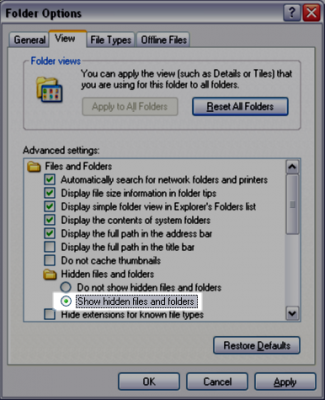
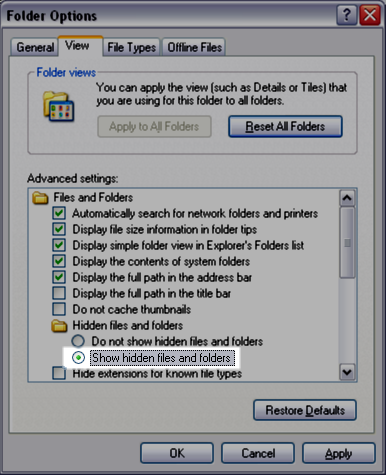
- Enable ‘Show hidden files and folders’ by clicking Start -> Control Panel -> Folder Options. Click on the View tab.

- Select ‘Show hidden files and folders’ and click OK.
- Go to My Computer and open your flash drive. There should be a file titled “AUTORUN.INF”. If this file exists, skip to Step 6.
- If there isn’t an Autorun.inf file, you’ll have to create one. Open Notepad and type:
[autorun]
Label=Removable DiskSave this file as AUTORUN.INF to the root of the drive (not in a folder).
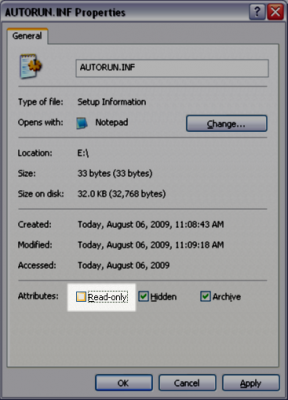
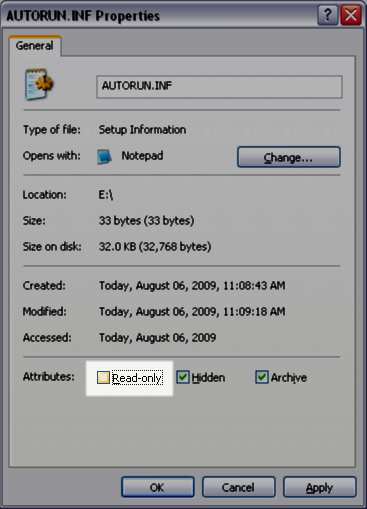
- Right click AUTORUN.INF and select Properties. Uncheck the Read-only box. Click OK.
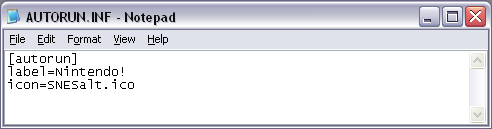
- Open the Autorun file and edit the text to look like this:
[autorun]
Label=What you want your drive to be named
Icon=icon.icoSubstitute your file name for the icon.ico (SNESalt.ico in my case)
- Save the file and safely eject your flash drive.
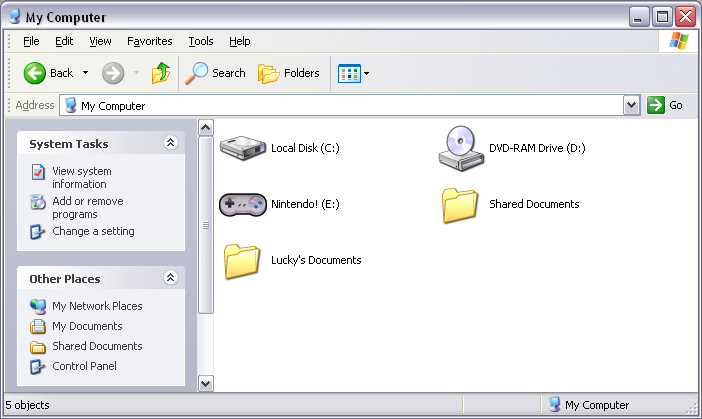
Now when you plug your flash drive into your computer (or any computer), it will have the new icon and name.
Once you’re finished, you may want to go back into the folder options and change the hidden files back to be hidden; some people find them annoying.
Have a great icon you’d like to share? Tell us about it in the comments.


Leave a Reply
You must be logged in to post a comment.