
 I have recently observed that after removing certain fake anti-spyware viruses (such as “Windows Security Center” or “Anti Virus 2010″), all executable (.exe) files will no longer open. No matter what file you try to open – iTunes, Firefox, or even Malwarebytes – they will not open because they are all .exe files.
To fix this problem, I came across a process that fixes the registry keys that have been changed due to this virus.
The Problem
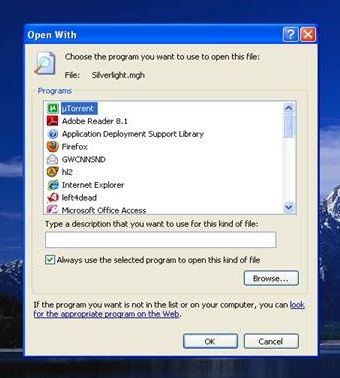
When attempting to open any executable file, you see the image shown below. It is a notification asking you to choose what program you would like to open the file with, which means Windows does not understand how to open .exe files.
 The Solution
Disclaimer: Before you start this guide, please keep in mind that this is an advanced procedure and you could potentially end up doing more harm than good by following this guide. If you are not comfortable with the procedures mentioned in this guide, please call your computer’s manufacturer for support or bring it to an authorized PC technician. We can take no responsibility for damage done to your system by following this guide.
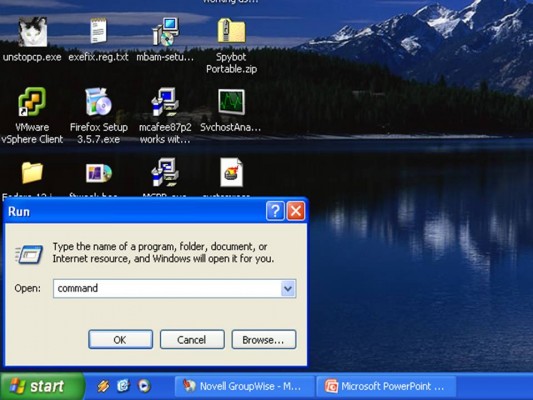
Step 1: Open the Run dialog box by going to Start -> Run or pressing WIN + R. Then open the command prompt by typing “command” (instead of typing “cmd” because “cmd” links to an .exe file which will not open). “Command” links to a .com file which is not affected by the virus.
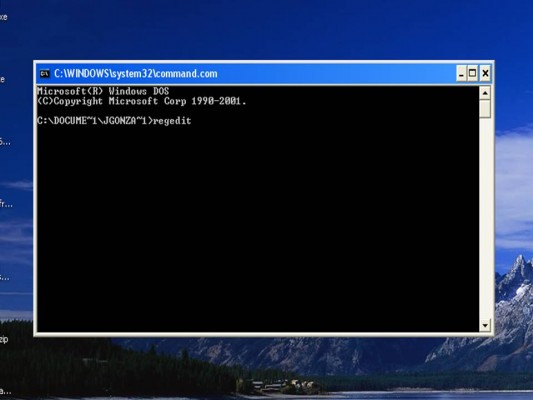
Step 2: Once you have opened the Command Prompt, type “regedit” and hit enter.
If you can’t open regedit (which is certainly possible because it is an executable file itself), try typing the following commands, one at a time, and press enter after each one.
cd \
cd \windows
copy regedit.exe regedit.com
start regedit.com
This makes a copy of regedit in the form of a .com file so it can be opened.
Step 3: As a precaution you should back up your registry. To do this, go to File->Export to save a backup file. You should save this backup to a USB flash drive or other type of portable media just in case you can’t access your hard drive.
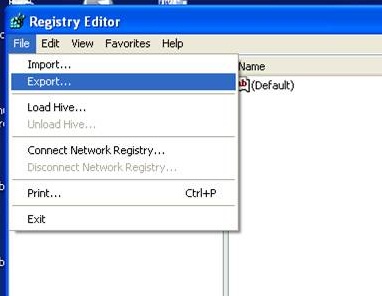
Leave the Registry Editor open after you have made a backup because you may need it in the next step.
Step 4: You will now need to run a special registry file that will re-establish the file associations for executable files. This file is specially tailored for your operating system, so make sure you use the correct file. You will need to right click these files and select Save As to download them to your computer.
- Windows XP .exe Registry Fix (provided by Fileext.com)
- Windows Vista .exe Registry Fix (provided by Winhelponline.com)
- Windows 7 .exe Registry Fix (provided by Winhelponline.com)
After downloading the correct file for your operating system, you need to try opening it to add those values to the registry.
a) You can first try double clicking the file (or right clicking it and selecting Merge). If this works you can skip to Step 5.
b) If a) didn’t work, go back to the Registry Editor which you opened in Step 2 and go to File -> Import. Navigate to the .reg file you downloaded and select it.
c) If neither of those worked, check out the final section of this guide for more help. Windows XP users can check out this guide which offers the registry fix in a .COM file format.
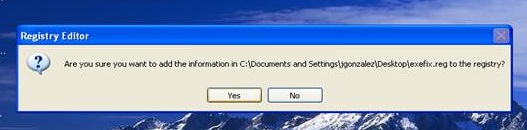
Step 5: If you were able to successfully install the registry fix for your operating system, you should be good to go now. Restart your computer and try opening any executable files to see if it worked.
If you encounter problems after changing your registry, you can restore the backup you made in Step 3.
If you still have problems
I’ve dealt with a few computers that have been afflicted with this problem, and I have discovered that there is a tremendous amount of variability that can occur. If this guide wasn’t able to help you, I recommend checking out the following guides which offer more solutions:
- Broken EXE Association by Fileext.com (very comprehensive)
- Can’t open EXE files by Microsoft Support
- Unable to Start a Program with an .exe File Extension by Ramesh Srinivasan
If you’re still stuck after that, post in the comments below and provide as much information as possible.
Remember, if in doubt: call your computer’s manufacturer for support or contact an authorized PC technician. We can take no responsibility for damage done to your system by following this guide.


Leave a Reply
You must be logged in to post a comment.